Native API Integration
Every Genum prompt comes with a ready-to-use HTTP API. You can trigger AI behavior programmatically, using versioned prompts as deterministic, testable logic components.
Authentication
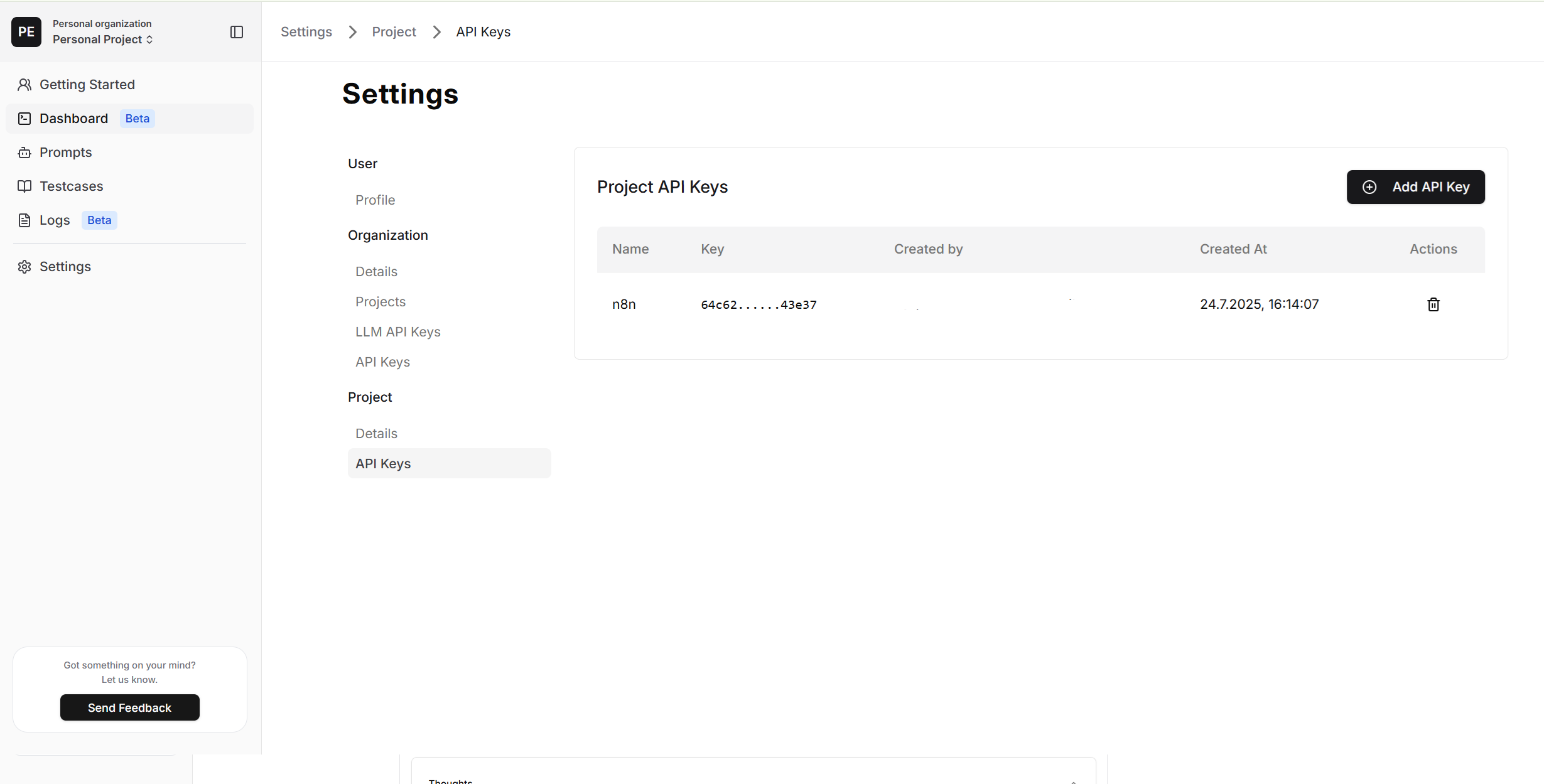
Genum uses Bearer token authentication. API Keys are managed under:
Settings → Project → API Keys
These keys are scoped by project and represent access to specific prompt environments and integrations.
API Methods
- Run Prompt
- Render Prompt
- Get Single Prompt
- Get All Prompts
- Create Prompt
Endpoint
POST https://api.genum.ai/api/v1/prompts/run
Headers
{
  "Authorization": "Bearer YOUR_API_KEY"
}
Request Body
{
  "id": "YOUR_PROMPT_ID",               // Required: Prompt ID
  "question": "Your input text here",   // Required: Input to process
  "files": [                            // Optional: up to 3 files, total request max 50MB
    {
      "fileName": "invoice.pdf",
      "contentType": "application/pdf",
      "base64": "JVBERi0xLjQKJ..."      // Base64 content (raw or data URL)
    }
  ],
  "placeholders": {                     // Optional: one value NAME per placeholder key
    "tone": "formal"
  },
  "productive": true                    // Optional: Use committed version (default: true)
}
productive: trueensures that only committed and tested prompts are executed. If the prompt has no committed version yet, the request fails with404.
placeholders selects, for each placeholder in the prompt, the name of the value to use. A placeholder you do not select uses its default value.
memoryKeymemoryKey is still accepted and is equivalent to "placeholders": { "memory_key": "..." }. If both are sent, placeholders.memory_key wins. See Migrating from Memory.
Response Format
{
  "answer": "Generated response",
  "tokens": {
    "prompt": 10,
    "completion": 20,
    "total": 30
  },
  "response_time_ms": 500,
  "chainOfThoughts": "Optional reasoning chain",
  "status": "Optional status (e.g. NOK: error message)",
  "placeholders": {
    "resolved": { "tone": "formal" },   // key -> the value name actually used (null if none)
    "ignored": ["language"]             // keys you sent that were not applied
  }
}
A key is ignored when the prompt text has no {{key}} for it, or when no value has the name you sent. In the second case the default value is used. Check ignored to catch typos early.
Error Handling
{
  "error": "Error message"
}
Errors may result from:
- ❌ Invalid API key
- ❌ Missing or incorrect prompt ID
- ❌ No committed version when
productiveistrue - ❌ Exceeded rate limits
- ❌ Upstream model failure
Returns the exact instruction Genum would send to the model, with placeholders filled in and the instruction format applied, without running it. Nothing is billed or logged.
Use it when your application runs its own agent loop: your model receives exactly what a Genum run or a Genum test replay sends, and you never have to reimplement placeholder substitution or formatting.
Endpoint
POST https://api.genum.ai/api/v1/prompts/{id}/render
Headers
{
  "Authorization": "Bearer YOUR_API_KEY"
}
Request Body (optional)
{
  "placeholders": {                     // Optional: one value NAME per placeholder key
    "tone": "friendly"
  },
  "productive": true                    // Optional: Use committed version (default: true)
}
Response
{
  "instruction": "<instructions>...</instructions>",  // exactly what the model receives
  "instructionFormat": "XML",
  "commitHash": "4f2a9c1e...",          // version rendered; null when the draft was used
  "languageModel": {
    "id": 1,
    "name": "gpt-4o",
    "vendor": "OPENAI"
  },
  "languageModelConfig": {
    "tools": [],
    "max_tokens": 16384,
    "temperature": 1,
    "response_format": "text"
  },
  "placeholders": {
    "resolved": { "tone": "friendly" },  // key -> the value name actually used (null if none)
    "ignored": [],                       // keys you sent that were not applied
    "undefinedKeys": []                  // {{key}} in the text that no placeholder defines
  }
}
commitHashnames the version that was rendered. If you send your agent's traces to Genum over OpenTelemetry, record it asgenum.prompt.version.- With
productive: true, a prompt that has never been committed is rendered from its draft, andcommitHashisnull. - A key listed in
undefinedKeysstays ininstructionas the literal text{{key}}.
Endpoint
GET https://api.genum.ai/api/v1/prompts/{id}
GET https://api.genum.ai/api/v1/prompts/{id}?productive=false
productive defaults to true: the prompt text, model and placeholders come from the latest committed version. Pass productive=false to read the current draft. A prompt that has never been committed always returns its draft.
Headers
{
  "Authorization": "Bearer YOUR_API_KEY"
}
Response
{
  "id": 616,
  "value": "Your prompt content here {{tone}}",
  "languageModelId": 1,
  "name": "New Prompt 1",
  "publicUrl": "",
  "languageModelConfig": {
    "tools": [],
    "max_tokens": 16384,
    "temperature": 1,
    "response_format": "text"
  },
  "instructionFormat": "XML",
  "assertionType": "STRICT",
  "assertionValue": "",
  "commited": false,
  "projectId": 63,
  "createdAt": "2025-01-01T00:00:00.000Z",
  "updatedAt": "2025-01-01T00:00:00.000Z",
  "commitHash": "4f2a9c1e...",
  "placeholderDefinitions": [
    {
      "key": "tone",
      "values": [
        { "name": "formal",   "content": "Answer formally.",       "isDefault": true },
        { "name": "friendly", "content": "Answer in a warm tone.", "isDefault": false }
      ]
    }
  ],
  "languageModel": {
    "id": 1,
    "name": "gpt-4o",
    "vendor": "OPENAI",
    "promptPrice": 2.5,
    "completionPrice": 10,
    "contextTokensMax": 128000,
    "completionTokensMax": 16384,
    "description": "GPT-4o is ...",
    "createdAt": "2025-01-01T00:00:00.000Z",
    "updatedAt": "2025-01-01T00:00:00.000Z"
  }
}
commitHashnames the version the returned text came from.nullmeans the draft was returned.placeholderDefinitionsare the placeholders of that same version, sovalueand its placeholders always match.
Endpoint
GET https://api.genum.ai/api/v1/prompts
Headers
{
  "Authorization": "Bearer YOUR_API_KEY"
}
Response
{
  "prompts": [
    {
      "id": 1,
      "name": "prompt name",
      "publicUrl": "",
      "assertionType": "STRICT",
      "languageModelId": 1,
      "createdAt": "2025-01-01T00:00:00.000Z",
      "updatedAt": "2025-01-01T00:00:00.000Z",
      "commited": false,
      "_count": {
        "testCases": 0
      },
      "branches": [
        {
          "promptVersions": []
        }
      ]
    }
  ]
}
Creates a prompt in the API key's project, together with its placeholders, and commits it immediately so it can be run with productive: true right away.
Endpoint
POST https://api.genum.ai/api/v1/prompts
Headers
{
  "Authorization": "Bearer YOUR_API_KEY"
}
Request Body
{
  "name": "Support assistant",
  "value": "You are a support assistant.\n\n{{tone}}",
  "languageModelName": "gpt-4o",        // Optional: a model enabled for your organization
  "languageModelConfig": {              // Optional: same shape as in Get Single Prompt
    "temperature": 0.2
  },
  "instructionFormat": "XML",           // Optional: XML (default) or RAW
  "placeholders": [                     // Optional
    {
      "key": "tone",
      "description": "How formal the answer is",   // Optional
      "values": [
        { "name": "formal",   "content": "Answer formally.", "isDefault": true },
        { "name": "friendly", "content": "Answer in a warm tone." }
      ]
    }
  ]
}
Without languageModelName, the default model is used. A model name that is not enabled for your organization returns 400.
Placeholder rules:
- A key contains only letters, digits and underscores, up to 64 characters, and is unique within the prompt.
- Every placeholder has between 1 and 100 values. Value names are unique within the placeholder.
- At most one value per placeholder has
isDefault: true. - A prompt can have up to 100 placeholders.
Response
{
  "prompt": {
    "id": 617,
    "name": "Support assistant",
    "value": "You are a support assistant.\n\n{{tone}}",
    "commited": true
  },
  "placeholders": {
    "undefinedKeys": [],  // {{key}} in the text that no placeholder defines
    "ignored": []         // placeholders whose {{key}} does not appear in the text
  }
}
Neither list is an error, but both usually mean a typo. An undefined {{key}} reaches the model as literal text, and a placeholder whose key is not in the text is never used.
Instruction Format
Every prompt has an instructionFormat that controls how its text is prepared before it is sent to the model:
| Format | What the model receives |
|---|---|
XML (default) | The prompt converted into structured XML: Markdown headings become XML tags, blank and --- lines are removed, and the result is wrapped in <instructions>. |
RAW | The prompt exactly as written, with placeholders filled in and no wrapper. |
All existing prompts use XML. Choose RAW when you want Markdown to reach the model as Markdown. The format can currently be set through the API, when creating a prompt.
The Render endpoint always returns the instruction in the prompt's format, so you can see exactly what the model receives.
Why Native API?
- Use Genum as a stable runtime layer
- Integrate with CI/CD workflows
- Reuse your testable prompts in production scenarios
- Control prompt execution through placeholders and version flags
- Render prompts for your own agent loop, identical to what Genum sends
- Create prompts with their placeholders programmatically
- Retrieve prompt metadata for integration and monitoring
- List all prompts for discovery and management
Native API makes your prompts portable, auditable, and production-grade.
Running your own agent? Send its traces back to Genum with OpenTelemetry and turn real conversations into test cases.